How to check my MOJ registration and professional licence
I’m Mohamed Khaled, UAE Ministry of Justice legal translator No. 688. My personal registration covers Arabic into English and English into Arabic and is valid until 8 March 2029. To check it, open the MOJ public translator search, select بحث عن مترجم, enter 688 in رقم القيد and press بحث.
Last updated:
How do I look up MOJ registration No. 688?
The Ministry of Justice’s translator search shows my personal registration. The English page says the search content is available only in Arabic.
From a browser in the UAE, the search for 688 returns a single card for me, Mohamed Khaled. It shows my Arabic name, a languages section, a phone number and the office where I work. My full verification guide explains each step and the result.
- Open the MOJ public translator search.
- Select the translator tab, بحث عن مترجم.
- Enter 688 in the registration number field, رقم القيد.
- Press بحث and look for محمد خالد السيد رزق.
Who holds MOJ No. 688 and professional licence 876257?
I hold MOJ registration No. 688 in my own name. I am registered for legal translation from Arabic into English and from English into Arabic, and my registration is valid until 8 March 2029.
AL QEMMA LEGAL TRANSLATION is the Sole Establishment I work through in Dubai. The business has its own professional licence. The records identify different holders and can be checked separately.
| Record | Holder | Number | Where to check |
|---|---|---|---|
| MOJ translator registration | Mohamed Khaled | 688 | MOJ public translator search |
| Dubai professional licence | AL QEMMA LEGAL TRANSLATION | 876257 | Dubai Department of Economy and Tourism business-licence search |
How do I check the business licence?
Enter 876257 in the Dubai Department of Economy and Tourism’s public business-licence search. Look for the trade name AL QEMMA LEGAL TRANSLATION.
The professional licence identifies the Sole Establishment through which I carry out my work. My MOJ registration applies to me as an individual translator. You can check each record using its own number.
What does my MOJ registration cover?
My registration covers my own Arabic-English legal translation work. It does not mean that an organisation receiving a translation has endorsed me. The recipient decides whether to take it, so ask the recipient about its requirements. I discuss that on my page about where a translation will be used.
For other language pairs, an MOJ-registered translator in my network carries out the work. I tell you who the translator is before we start. I include their full name and MOJ registration number with the delivery, and that registration applies to their work.
If you would like to see my MOJ registration card, ask me via WhatsApp and I can send you a copy. My stamp carries my name and registration number. You can contact me to discuss either record.
If you need MOJ document attestation
If you need attestation, you can apply yourself through the Ministry of Justice’s Unified Gate using UAE Pass. I’ve followed the Ministry’s own guide in the steps below. The screens open in Arabic by default, but there’s an English switch at the top. The Ministry decides whether to approve each request.
Open the MOJ Unified Gate
Go to the MOJ Unified Gate (document attestation service). It opens in a new tab.
Sign in with UAE Pass
Choose “Sign in with UAE Pass” and approve the login on your phone. New users create a Unified Gate account through UAE Pass first.
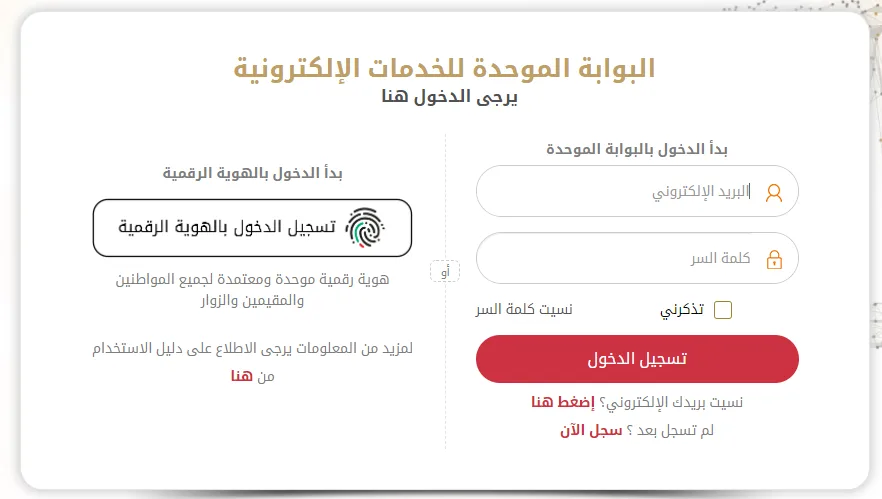
Screenshot from the UAE Ministry of Justice’s “Electronic Attestation System: User Guide” (v2.0, Arabic), on moj.gov.ae. Go to the services list
From the home screen open “Our Services”. The dashboard also shows any requests you have already made.
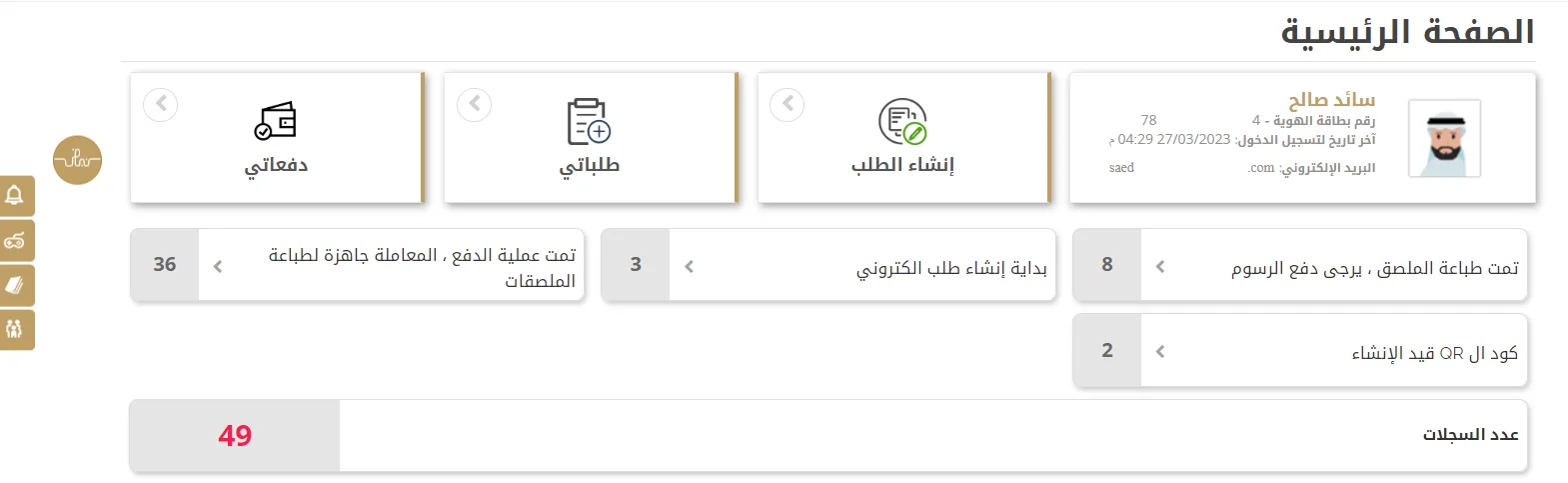
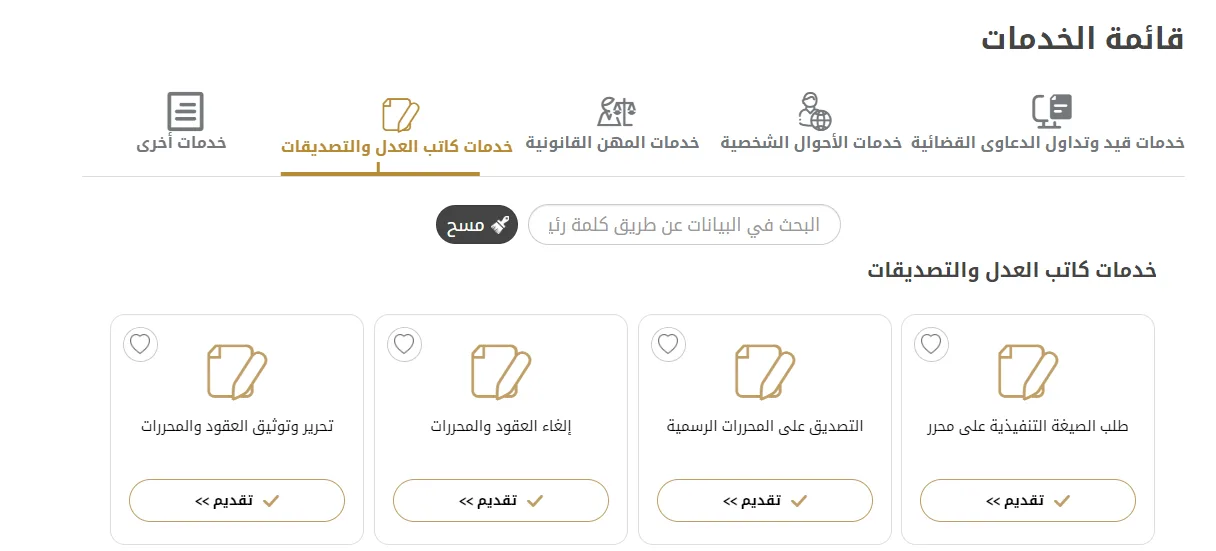
Screenshot from the UAE Ministry of Justice’s “Electronic Attestation System: User Guide” (v2.0, Arabic), on moj.gov.ae. Choose Notary Public and Attestation Services
Select the attestation service. This is where the Ministry attests documents, including translations stamped by its registered legal translators.
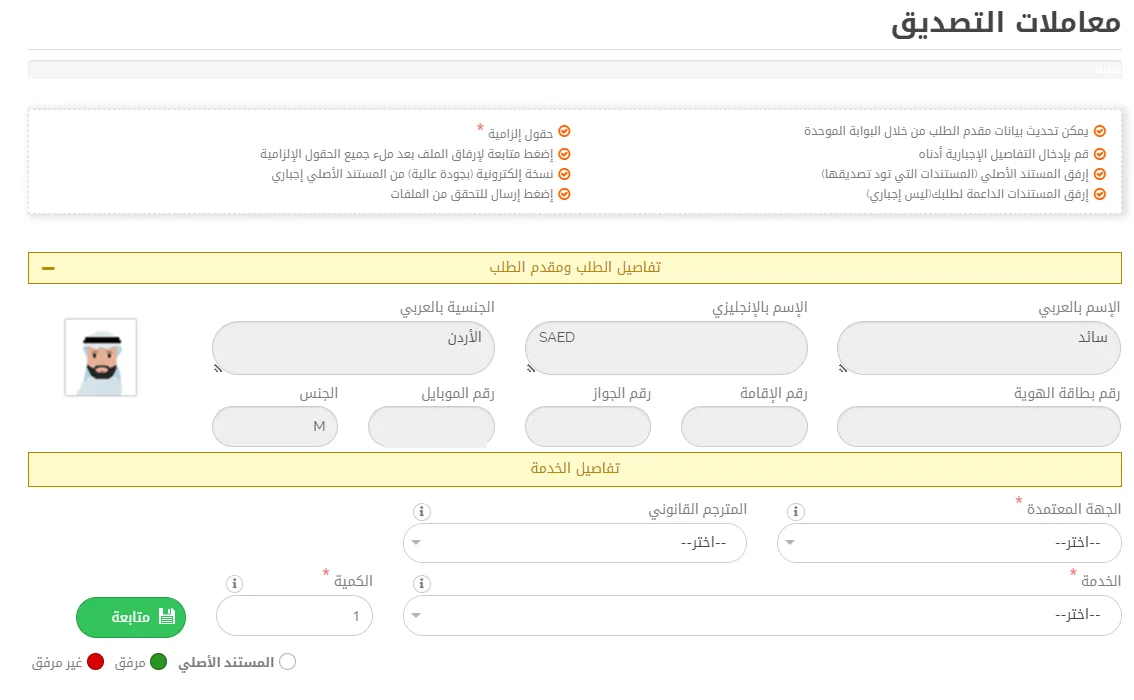
Screenshot from the UAE Ministry of Justice’s “Electronic Attestation System: User Guide” (v2.0, Arabic), on moj.gov.ae. Fill in the attestation request
Enter the requested details for your document and save. The Ministry reviews each request before approving it.
Screenshot from the UAE Ministry of Justice’s “Electronic Attestation System: User Guide” (v2.0, Arabic), on moj.gov.ae. Attach the translation and the original
Upload the translated document as the main file, and the original as a supporting file. Then submit.
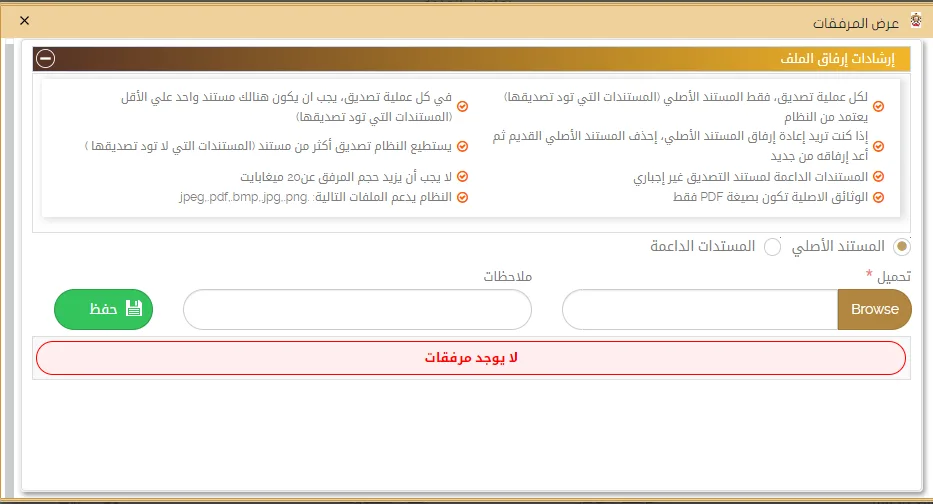
Screenshot from the UAE Ministry of Justice’s “Electronic Attestation System: User Guide” (v2.0, Arabic), on moj.gov.ae. Pay and download
Once the Ministry approves the request, pay the fee online and download the attested document from “My requests”.
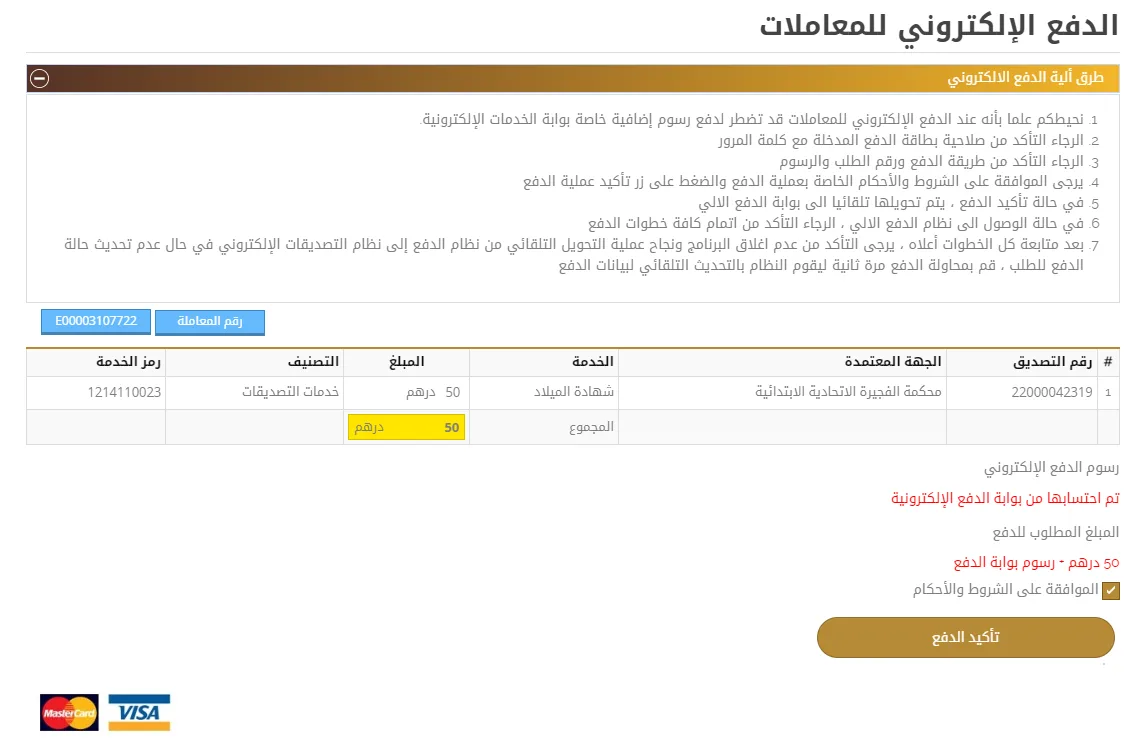
Screenshot from the UAE Ministry of Justice’s “Electronic Attestation System: User Guide” (v2.0, Arabic), on moj.gov.ae.
For procurement teams
If your procurement team needs to register Al Qemma Legal Translation as a supplier, message me. I’ll send the business information you need for your vendor file.
I can send a trade licence copy and bank details for your vendor file. If tax registration applies, I’ll include that too.

Tell me what you need translated.
Start with a description of the document and whether you need Arabic or English. It helps to know the approximate length, who will receive it and your deadline. Please don't send sensitive personal or case files in your first message.
Monday to Friday, 9am to 9pm UAE time. At least two business days. I agree the actual delivery date before I start.